
❗ The Problem
After updating to WordPress 6.1, your site throws a fatal error:
Fatal error: Uncaught Error: Call to undefined method WP_Textdomain_Registry::reset()
in LanguageSwitch.php on line 139
This happens only on sites using WPML, and deactivating the WPML plugins brings the site back—though that’s only a temporary solution.
✅ The Cause
WordPress 6.1 introduced breaking changes that require updated versions of WPML and its add-ons. Older versions are incompatible and throw errors, as seen above.
WPML’s Statement:
WPML Multilingual CMS 4.5.12 and WPML String Translation 3.2.3 are required for compatibility with WordPress 6.1.
View official changelog →
🛠️ Permanent Fix: Update WPML Plugins
Follow these steps:
Backup your website (just to be safe).
Download the latest WPML plugins from your account:
https://wpml.org/account/downloads/Manually update via FTP or File Manager:
Deactivate current WPML plugins.
Delete the plugin files (not the database).
Upload the latest plugin versions.
Reactivate them.
📄 Full instructions: Updating WPML Manually
You won’t lose any translation data—WPML stores them in the database.
🩹 Quick Fix: Temporary Workaround (Not Recommended Long-Term)
If you can’t update WPML right away, use this quick patch:
Go to:
/wp-content/plugins/wpml-string-translation/classes/MO/Hooks/LanguageSwitch.php
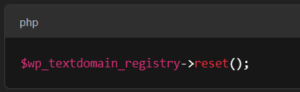
On line 139, change this:
$wp_textdomain_registry->reset();
To:
reset($wp_textdomain_registry);
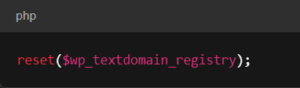
💡 This bypasses the missing method error—but it’s not future-proof. Always plan to upgrade.
✅ Final Thoughts
WordPress core updates can introduce breaking changes—especially when working with plugins as deep as WPML. Staying on top of plugin versions ensures smooth performance and fewer surprises.
Enjoy our content? Add us as a preferred source on Google.

